 QuickMovie
Copyright Checklist for Turning Your Blog into Video
QuickMovie Team · 2026-10-10
Turning your own writing into video is usually fine, but whether the photos, music and quotations mixed into it are all yours is a separate matter. Checking the items below before uploading prevents your video from being taken down later. This is general information, not legal advice.
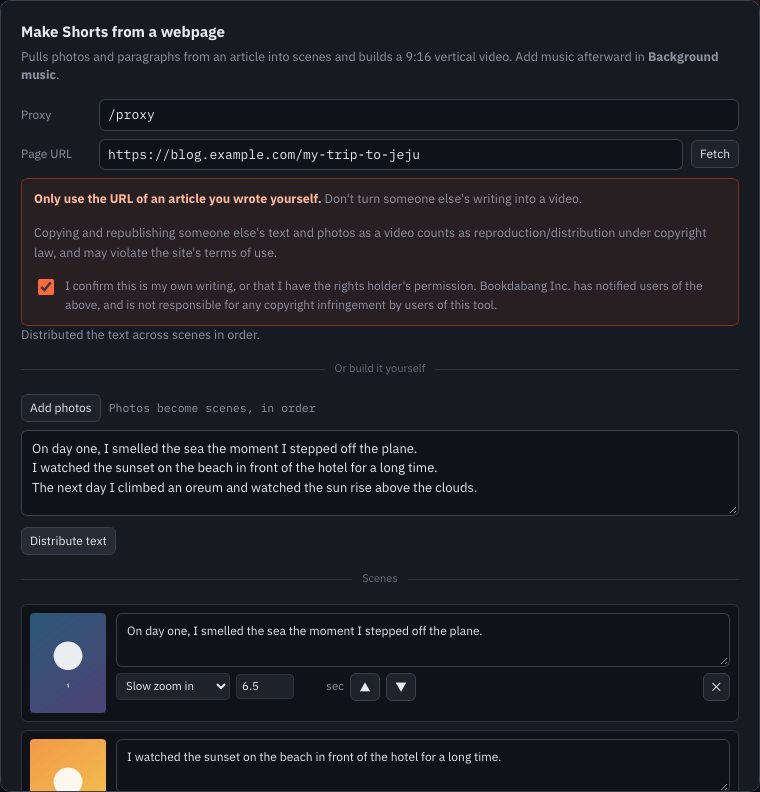
1. Did you write the text?
If the text is your own sentences, using it as subtitles is fine. If it copies another text or is built mostly from quotations, it cannot simply be made into video. Quotations must be appropriate in scope and purpose and credit the source.
2. Did you take the photos?
- Photos you took yourself can be used.
- Photos from the internet, product images and news photos need separate permission or terms of use.
- Even photos from free image sites have different conditions per site (credit, commercial use).
3. Are there people in the photos?
If another person's face is clearly visible, it can raise portrait-rights issues. Ask family and friends whether it's okay to publish them in video. Be especially careful with photos of children.
4. Music and sound effects
Use only music with confirmed permission. Laying a popular song under your video can be judged as infringement. Music provided by a platform may be usable only inside that platform, so check the conditions.
5. Trademarks and sponsorship disclosure
For product reviews, you may need to clearly mark sponsorship or advertising in the video. The obligation depends on the country and platform rules, so check them.
6. Exposure of personal information
Check that no address, phone number, license plate or account screen is visible. Something masked on the blog can reappear during conversion to video.
Last check before posting
- Did you confirm the source and permission of the text, photos and music?
- Are faces or personal information exposed?
- Is any of it content that needs an ad or sponsorship disclosure?
Check before you make it
Copyright checks seem tedious, but doing them before you make the video keeps the burden small. The problems are mostly music and photos. Even with text you wrote, a photo or two taken from the internet or a trending song laid under it often leads to the video being removed later. The simplest approach is not to use material of unknown origin from the start.
Common mistakes
- Thinking 'credit is enough' and using something without permission (credit doesn't replace permission)
- Assuming a free image is also free for commercial use
- Using another person's face or a child's photo without consent
This article is based on the actual screens and features of the QuickMovie editor. Platform policies and numbers can change, so check the latest guidance before you upload.