 QuickMovie
Vertical Video Size and Aspect Ratio for Shorts, Reels and TikTok
QuickMovie Team · 2026-10-10
Short vertical videos share nearly the same basic specs across platforms. Get these right the first time and your video won't be cropped or look broken wherever you upload it. The values below are commonly recommended; platform policies change, so check the platform's latest guidance before uploading.

Aspect ratio and resolution
The vertical standard is 9:16, usually at 1080×1920. Lower resolutions can be uploaded but may look soft on a phone, and higher ones mostly add file size without a visible gain. Square (1:1) and 4:5 are used in feeds, but if you want full-screen playback, 9:16 is best.
Safe zone (areas that won't be covered)
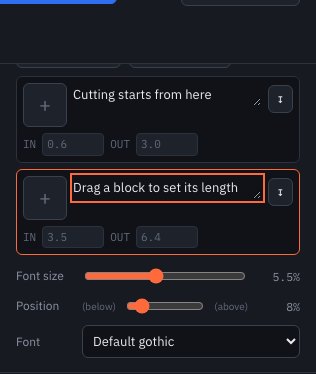
The top and bottom of a vertical video are covered by platform buttons, account names and captions. Keep important text and faces in the middle, away from roughly the top 10% and bottom 20%. Text stuck to the very bottom can be hidden by the description, so raise the subtitle position slider a little in QuickMovie.
Frame rate
30 fps is enough for typical video. Fast motion (sports, screen recordings with lots of scrolling) looks smoother at 60 fps, but the file is larger — choose by purpose.
File format
MP4 (H.264 video + AAC audio) is the safest choice on most platforms: it plays on almost every device and rarely causes re-encoding issues. WebM plays well in browsers but may be rejected by some services.
Caption size
A phone is a small screen and small text is unreadable. A text size of about 5–6% of the video height in a bold sans-serif is readable in most cases. If the background is busy, add a dark outline or a semi-transparent box behind the text.
Length
Allowed lengths differ by platform and change often. What matters more than the limit is the first few seconds: be clear about what the first scene shows, and cut unnecessary lead-in boldly.
How to check the safe zone
Even if you know the specs, the most accurate way to see what gets covered is to look. Upload privately to the platform, play it on your phone, and check whether captions or important objects are hidden by the description at the bottom or buttons on the right. If they are, raise the subtitle position slider and export again.
Using landscape footage on a vertical screen
Placing landscape footage into 9:16 as is leaves black bars above and below. Zooming to fill crops the sides, so first check that the subject is in the center. In QuickMovie's framing setting, choose 'Letterbox' or 'Fill' depending on the situation.
Common mistakes
- Placing captions at the very bottom edge where the description covers them
- Raising the resolution without shortening the video, making the file needlessly large
- Uploading a square video for full-screen use, leaving it looking empty above and below
Vertical video dimensions at a glance
These are the sizes most often recommended. Platforms change their rules, so treat the table as a starting point and check the platform's current help page before uploading.
| Where you post | Aspect ratio | Common resolution | Notes |
|---|---|---|---|
| YouTube Shorts | 9:16 | 1080×1920 | Full-screen vertical; keep key content away from the top and bottom edges. |
| Instagram Reels | 9:16 | 1080×1920 | The caption and buttons cover part of the bottom and right side. |
| TikTok | 9:16 | 1080×1920 | Username and description sit over the lower part of the video. |
| Instagram feed (portrait) | 4:5 | 1080×1350 | Not full-screen, but takes more space in the feed than square. |
| Square post | 1:1 | 1080×1080 | Works everywhere; leaves empty bars when played full-screen. |
In QuickMovie, pick Vertical 9:16 · 1080×1920 in the aspect-ratio dropdown next to the play bar. It is the default, so a new project already has the right size.
Frequently asked questions
What is the aspect ratio of a vertical video?
The standard is 9:16: for every 9 units of width there are 16 units of height. It is the same shape as a 16:9 landscape video turned on its side.
What resolution should a vertical video be?
1080×1920 (Full HD portrait) is the usual choice. 720×1280 works for lighter files but looks softer on newer phones. Going above 1080×1920 mostly increases file size without a clear visual benefit on a phone screen.
What size should a YouTube Short be?
Use 9:16 at 1080×1920. A video that is square or landscape can still be uploaded, but it will not fill the phone screen the way a vertical one does.
What is the frame size for a short video?
Frame size means the width and height in pixels. For short vertical video that is 1080 pixels wide and 1920 pixels tall, played at 30 frames per second in most cases.
Can I turn a landscape video into a vertical one?
Yes. Set the output to 9:16, then choose in the clip's framing setting whether to show the whole picture with black bars (letterbox) or to fill the frame and crop the sides. If something important sits near the edge, crop it on purpose with QuickMovie's crop tool before you fill the frame.
This article is based on the actual screens and features of the QuickMovie editor. Platform policies and numbers can change, so check the latest guidance before you upload.