 QuickMovie
Adding Narration and Background Music: What to Watch
QuickMovie Team · 2026-10-10
Sound strongly shapes a video's impression. When you use voice and music together, balance them so they don't fight, and check the rights to the audio you use. Use the checks below.
The voice must come first
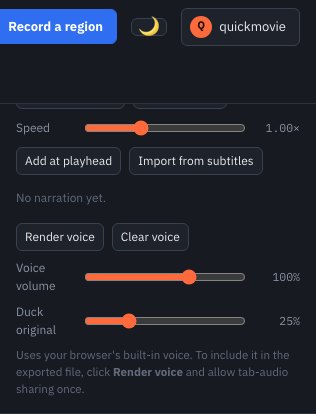
Background music should sit lower than speech. A feature that lowers music automatically while speech plays (ducking) makes this easy. Start with music at about 30–40% of the voice level and adjust. Check on both speakers and earphones rather than only by ear.
Improving voice quality
- Record in a quiet place with the microphone about a hand's width from your mouth.
- Reading slowly and clearly also makes it easier to align with subtitles.
- With synthesized speech (TTS), split sentences short and use commas and periods to shape the breathing.
Synthesized speech and voice cloning
If the default voice sounds mechanical, you can have your own recorded voice read the text. Never clone someone else's voice without permission; the sample must be your own or used with permission.
Music copyright
Using music found online as is can cause copyright problems; uploads may be flagged and muted or removed. Use clearly licensed free music, music you made, or purchased tracks, and check whether credit is required.
Soft start and end
Music that starts and ends abruptly feels awkward. Fading in at the start and fading out at the end makes it look much more finished.
Final check
- Turn the sound off and check the subtitles alone convey the content.
- Turn the sound on and check nowhere is speech buried by the music.
- Re-check the terms of use of the music.
Order for balancing volume
It is easiest to set volume in order. First set the narration level on its own, then add background music and check that speech isn't buried. Finally, if the original video has sound, set it to lower automatically while narration plays (ducking). In this order it is easy to tell which part is the problem.
Common mistakes
- Putting music too loud so speech is buried
- Synthesized speech whose reading speed doesn't match subtitle length → shorten sentences and adjust start positions.
- Using music of unknown origin as is
This article is based on the actual screens and features of the QuickMovie editor. Platform policies and numbers can change, so check the latest guidance before you upload.