 QuickMovie
How to Reduce Video File Size and Keep Quality
QuickMovie Team · 2026-10-10
Video files are often too big to upload or send. File size is determined by a few factors multiplied together, so once you know what to reduce you can shrink a file with little loss of quality.
What decides the size
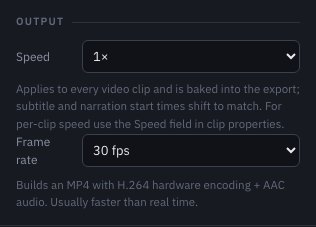
Size is roughly bitrate × length. Bitrate is the data used per second; higher resolution and frame rate need more bitrate for the same quality. To shrink a file, reduce length, resolution, frame rate or bitrate — one or more.
1. Shorten it first
This is the surest method with no quality loss. Cutting unneeded starts, ends and filler can shrink the file a lot. Removing silences and increasing speed also shorten length.
2. Match resolution to purpose
A video for phones doesn't need to be 4K. 1080×1920 for vertical and 1920×1080 for landscape is enough in most cases. Before lowering resolution, check that the aspect ratio of the original is kept.
3. Reduce frame rate
Screen recordings or slide-like videos with little motion are fine at 24–30 fps. If there's no reason for 60 fps, exporting at 30 fps is better for size.
4. Bitrate and format
H.264 MP4 is compatible and gives stable quality for its size. Saving at an unnecessarily high bitrate only grows the file. The simpler the video (the more still it is), the better quality holds at a lower bitrate.
5. Check the sound too
It is small compared with video, but audio size matters too. If a video doesn't need sound, keep it muted; if you don't need the music, leave it out.
A quick order of decisions
- Cut what can be cut.
- If it's still big, check the output ratio and frame rate.
- If it can't be sent in one piece, split it into two videos.
What to reduce first
In general, cutting unneeded sections is the most effective method with no quality loss. Lowering 60 fps to 30 fps helps next. Lowering resolution from 1080p to 720p shrinks the file but may look soft even on a phone, so decide carefully by purpose.
Common mistakes
- Lowering only the resolution while keeping the length, which hurts quality for little gain
- Compressing the same video repeatedly so quality keeps getting worse → always export once from the original.
- Lowering quality so far to meet a size limit that text becomes unreadable
This article is based on the actual screens and features of the QuickMovie editor. Platform policies and numbers can change, so check the latest guidance before you upload.